Variables
If you don't see this page, you need to enable the Advanced options toggle in the top right.
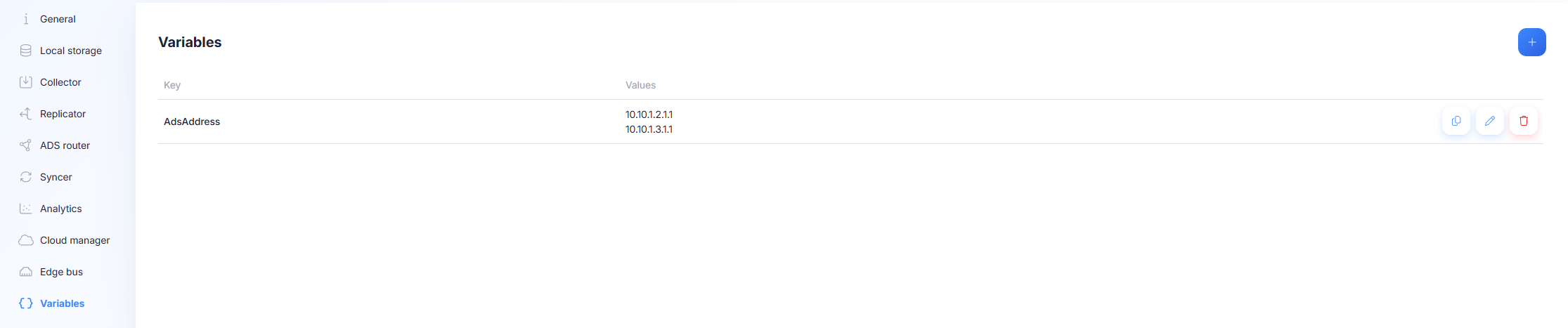
Variables are placeholders you can use in a configuration (for example in a connection address, name, or other text fields). When the configuration is applied, Capture replaces placeholders with the configured variable values.
Variables are a reuse mechanism. They let you deploy the same configuration to multiple gateways while changing only the per-gateway variable values.
Placeholder syntax
Variables must be prefixed with a dollar sign ($).
- Variable key:
PlcAddress - Placeholder usage:
$PlcAddress
If the $ prefix is missing, the value is treated as literal text and no replacement occurs.
Where variable values are defined (precedence)
Variable values can be assigned at two levels:
- Configuration level (defaults for the configuration)
- Gateway level (overrides for a specific gateway using the configuration)
This allows variables to be used as a template within a configuration, or a single configuration to be reused across multiple devices even when connection details differ per device.
If a variable is defined both on gateway level and configuration level, the values are combined.
Multiple values per variable (connection generation)
A variable can have multiple values.
When a variable used by a connection has multiple values, Capture generates multiple connections, one per value.
This is typically used to generate many similar connections from one template connection definition.
If you use multiple multi-valued variables in the same connection template, keep their value lists aligned and deterministic. Mismatched lists can produce unexpected results depending on how the system expands templates.
Manage variables in the UI
- Select + to add a variable.
- Provide a Key and one or more Values.
- Edit or remove variables using the row actions in the list.
Example 1: Connection generation (multiple values)
Goal: generate two ADS connections from one template by using variables in the connection name and address.
Template connection:
Name:    ADS_$PlcName
Address: $PlcAddress
Define variables:
PlcName:    Foo, Bar
PlcAddress: 10.40.10.1.1.1, 10.40.10.2.1.1
Result when the configuration is downloaded by a gateway:
ADS_Foo -> 10.40.10.1.1.1
ADS_Bar -> 10.40.10.2.1.1
Example 2: Per-gateway override (same config, different device)
Goal: use the same configuration on multiple gateways while pointing the ADS connection at a different address per gateway.
Template connection:
Address: $AdsAddress
Gateway A override:
AdsAddress: 10.40.10.1.1.1
Gateway B override:
AdsAddress: 10.40.10.2.1.1
Result:
- Both gateways run the same configuration.
- Each gateway uses its own ADS address because gateway-level values override configuration-level values.