Captain and MCP
Captain is the integrated AI system inside Capture, here to help you sail your sea of data. Ask a question in plain language, and Captain finds the answer in your documentation and in your own data, then shows you where it came from.
MCP is the open standard that lets an AI assistant use the tools of another system. Capture has an MCP server, so the tools behind Captain are also available to the AI tools you already use.
What is Captain?
Captain is the AI assistant at the top right of Capture. It lives inside the platform, so it knows which company you work in and only uses what you are allowed to see.
With Captain you can:
- Ask about Capture and your own documentation. Answers cite the documents they came from.
- Work with your data. Captain reads the UNS and the raw data, dashboards and the logbook, and gives you charts and numbers straight from the source.
- Let it do the work. Where your role allows it, Captain can also change things, for example build a dashboard or update the UNS.
- See how it got there. Every answer keeps the steps Captain took one click away.
Captain and the MCP server ship with Capture Cloud 3.9. The version badges on these pages show what each feature needs.
What is MCP?
The Model Context Protocol (MCP) is an open standard that lets an AI assistant discover and call the tools of another system. A system describes its tools once: what each tool does, what it needs, and what it returns. Any assistant that speaks MCP can then find those tools and use them, without a custom integration for every assistant.
That is where the power is:
- One integration, every assistant. Describe a tool once and Claude, Mistral Vibe, Codex or Microsoft Copilot Studio can all use it.
- Real data instead of guesses. An assistant that can call a tool works with the actual value, not with what it remembers from training.
- Your permissions go with you. Every call runs as you, so a tool you may not use is simply not there.
In Capture, each function can define its own tools, and a central MCP server hands them out. You rarely see it, but everything on this page runs through it. Read more on the MCP page.
How the pieces fit together
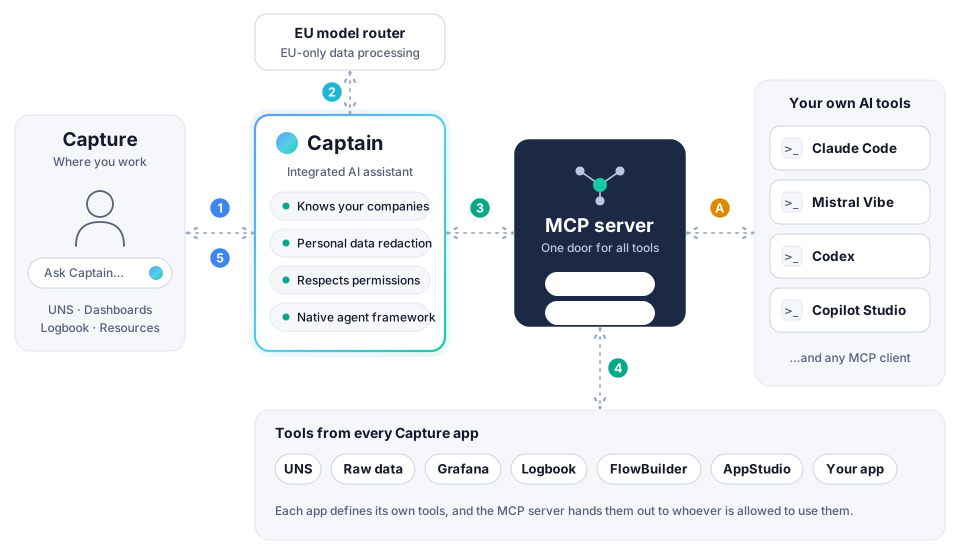
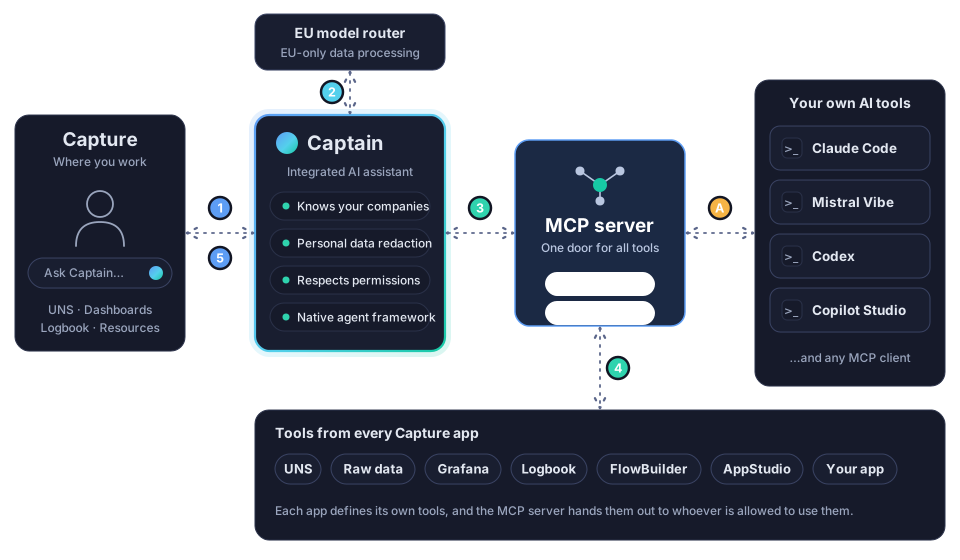
The dots in the figure follow one question through the system. Blue is you and Captain, cyan is the AI model, green is a tool, and orange is one of your own AI tools using the same door.
- You ask. You type a question in Capture. Captain adds what it knows about your company and what you are looking at.
- Captain thinks. Captain asks an AI model, through an EU-only router, which tools it needs. Personal data is replaced by placeholders before anything leaves Capture.
- Captain calls a tool. It sends the request to the MCP server.
- The tool runs. The MCP server hands the request to the Capture app that owns the tool, such as UNS, Grafana or the logbook, and only if you are allowed to use it. The result flows back the same way.
- Captain answers. It writes the answer, with the sources and the steps it took.
A. Your own AI tool. Claude Code, Mistral Vibe, Codex or Copilot Studio connect to the same MCP server and call the same tools. What they do not have is everything Captain adds on top, which is explained on the MCP page.
Explore
Captain
Open Captain, organize chats per company, add context, share your documentation, read an answer and its steps, and see what Captain can do and how your data is protected.
MCP
Learn what MCP is and why it matters, connect Claude Code, Claude or another AI tool to the Capture MCP server, and see how that differs from using Captain.