Local storage
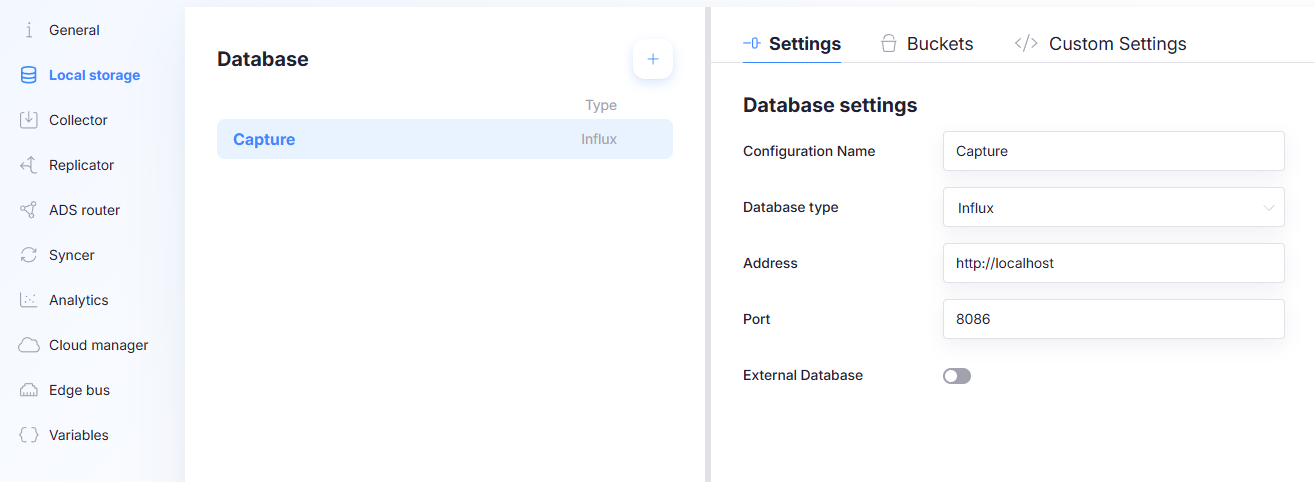
The Local storage page configures where the gateway stores collected data locally. You can define one or more databases, configure retention buckets, and apply advanced settings through a JSON editor.
Databases
The database list shows all configured local databases for this gateway configuration.
-
Add a database: Create a new database configuration using the Add action in the database list.
-
Duplicate a database: Duplicate creates a copy of an existing database configuration. Use this when you need the same setup with small changes (for example, a different address, port, or database type).
-
Delete a database: Delete removes the selected database configuration.
Settings (Database settings)
The Settings tab defines how the gateway connects to the selected database.
Configuration Name
A human-readable name for the database configuration.
Database Type
Select the backend used for local storage. Options include:
- Influx
- CSV
- MQTT
- Redis
- Influx 2
- NATS JetStream
- TimescaleDB - Wide Table
- TimescaleDB - Narrow Table
- SQLite Queue ¹
¹ Edge2.3.1+ Older Capture Edge versions do not have this database type.
Influx (default)
- Default local storage backend.
- Persistence: stored on disk.
- Syncer: can be used by the Syncer to synchronize data to the cloud.
- Schema: always wide table (columns represent variables).
CSV
- Write-only export.
- Persistence: written to CSV files (disk).
- Syncer: cannot be used by the Syncer to synchronize data to the cloud.
- Purpose: export all gathered data to CSV so it can be imported into other tools.
MQTT
- Write-only export.
- Persistence: not a database; data is published to MQTT.
- Syncer: cannot be used by the Syncer to synchronize data to the cloud.
- Behavior: exports all data to MQTT.
- Note: exporting specific variables or publishing to custom topics is handled through replicators.
Redis
- In-memory storage backend designed to minimize disk I/O.
- Persistence: stored in memory only (not on disk).
- Syncer: can be used by the Syncer to synchronize data to the cloud.
- Use case: systems where disk reads/writes are an issue.
- Important: unsynced data is lost after a system restart.
Influx 2
- Sync-from only (current limitation).
- Write support: not supported yet to write to.
- Syncer: can only be used as a source to sync from.
NATS JetStream
- Sync-from only (current limitation).
- Write support: not supported yet to write to.
- Syncer: can only be used as a source to sync from.
TimescaleDB - Narrow Table
TimescaleDB is a time-series extension on PostgreSQL. The narrow table model stores values in typed columns plus an identifier.
- Persistence: stored on disk (PostgreSQL).
- Schema: the value is stored in a column according to the value type, combined with an identifier column, which is set to the name of the variable.
TimescaleDB - Wide Table
- Persistence: stored on disk (PostgreSQL).
- Schema: wide table layout with a column for each variable (like Influx).
SQLite Queue
A durable queue between the Collector and the Syncer, in a single SQLite file on the gateway. The Collector appends points to it, and the Syncer deletes them as soon as the cloud has accepted them — so the file stays roughly the size of the backlog rather than growing to a retention window.
- Persistence: stored on disk, in one
.dbfile. It survives a restart and a power cut. - Syncer: can be used by the Syncer to synchronize data to the cloud.
- Dependencies: none. There is no server to install, configure, start or monitor.
- Retention: none, and none is configurable. Data is kept until it has been synced, and is then removed. Buckets have a queue size instead of a duration — see Buckets.
- Out-of-order points: accepted. Unlike the time-series backends, a queue has no watermark, so a point that arrives late is simply appended and uploaded like any other.
- Use case: the gateway only needs to get data to the cloud, and nothing on the device queries it back — no local Grafana, no local dashboards, no Analytics jobs reading from it.
A queue is a pipe, not a database. Nothing reads it back except the Syncer, and what the Syncer has uploaded is deleted — so a local Grafana dashboard and the Analytics service, which both query the local database, have nothing to work with here. Downsampling does not apply either: a queue has no retention policies, so a downsample bucket on it does nothing.
If something on the device has to read collected data back, give that data an Influx or TimescaleDB database — either instead of the queue, or in addition to it, by sending the measurement to both.
A queue has no per-destination bookkeeping: whichever sync destination reads a batch first removes it from the queue. Sending the same measurement from a queue bucket to two sync destinations is therefore not supported. Capture Edge detects this when the configuration is loaded, logs an error and keeps the measurement on the first destination only.
Address
The host address used to connect to the database (example: http://localhost).
For SQLite Queue this field is labelled Custom Filepath instead, and it holds a location on the gateway's own disk rather than a host:
- Leave it empty (recommended) to let Capture pick the location: a
SQLiteQueuefolder under the Capture data directory, with one file per database configuration, named after it.- Windows:
C:\ProgramData\Capture\Data\SQLiteQueue\<Configuration Name>.db - Linux:
/etc/capture/Data/SQLiteQueue/<Configuration Name>.db
- Windows:
- A folder puts the file in that folder, still named after the configuration. Useful for putting the queue on a different disk.
- A full file path (ending in a file name with an extension) uses exactly that file.
Port
The port used to connect to the database (example: 8086).
Not shown for CSV or SQLite Queue, which do not connect over the network.
External Database
When enabled, the database is treated as an external service (meaning Capture will not install, configure or manage it) and credentials can be configured.
Not shown for SQLite Queue: the queue file is always Capture's own.
Username / Password
Credentials used to authenticate against the external database.
Buckets
Buckets define retention policies (how long data is kept). Each bucket includes:
- Bucket name
- RP name (retention policy name)
- Duration (example values:
7d,31d) - Important flag
The columns shown depend on the database type. A SQLite Queue has no retention policy, so RP name and Duration are replaced by Max Queue Size and When Full; its Bucket name column is labelled Queue name.
Important
Buckets marked as Important are not deleted when the disk is getting full.
This flag exists to protect critical datasets from automatic cleanup under disk pressure.
Max Queue Size (SQLite Queue)
How many points this queue may hold before it starts dropping them. The default for a new queue bucket is
1000000. Use -1 for an unlimited queue.
An unlimited queue keeps growing for as long as the cloud is unreachable, and it is on the gateway's own disk. Set a limit unless you are confident the disk can absorb the longest outage you expect.
The Syncer's Min points to sync must be smaller than the smallest Max Queue Size it reads from, otherwise the queue can fill up with a batch that is permanently too small to be uploaded. Capture Edge lowers Min points to sync for you when a configuration gets this wrong, and says so in the log.
When Full (SQLite Queue)
What to do with a point that no longer fits:
| Option | Behaviour |
|---|---|
| Drop Oldest | Delete the oldest queued points to make room. You keep the most recent data and lose the start of the outage. |
| Drop Newest | Fill the queue to its limit and refuse everything after that. You keep the beginning of the outage and lose the most recent data. |
Dropped points are reported as an error in the Collector's log, with the table and the number dropped. They are not recoverable — a dropped point was never written to the queue, so nothing uploads it later.
Drop Oldest is the usual choice: after a long outage the recent data is normally what matters. Pick Drop Newest when the start of an event is what you are logging for.
Low-disk cleanup
When the gateway is running out of disk space, Capture Edge trims the oldest 5% of every non-Important queue table, and reclaims the freed space in the file. Buckets marked Important are left alone, so mark the queue holding data you cannot lose.
Custom Settings (Advanced)
The Custom Settings tab is a JSON editor for advanced configuration. Use this only when you need behavior that is not covered by the standard UI fields.
Supported options
TryToConvertDataInCaseOfTypeMismatch If set to true, data being written to the local database will be converted to the correct type if there is a type mismatch. This has a performance impact, so only enable this when necessary. Default: false
WriteQueueMaxSizeMB Maximum size of each write queue in MB. A write queue holds the data in memory that is waiting to be written to the local database. If the database is down, the queue will grow until it reaches this size. When the queue is full, the oldest data will be dropped, and the Collector logs an error for that table once a minute. Default: 50, minimum: 10
There is one write queue per table in each local database: one per bucket and measurement for Influx, one per
table for TimescaleDB, and one per stream for Redis. The setting applies to each queue separately, so in the worst
case the write queues of one local database use the number of tables × WriteQueueMaxSizeMB of memory. On a gateway
with many measurements, consider lowering this value.