Analytics
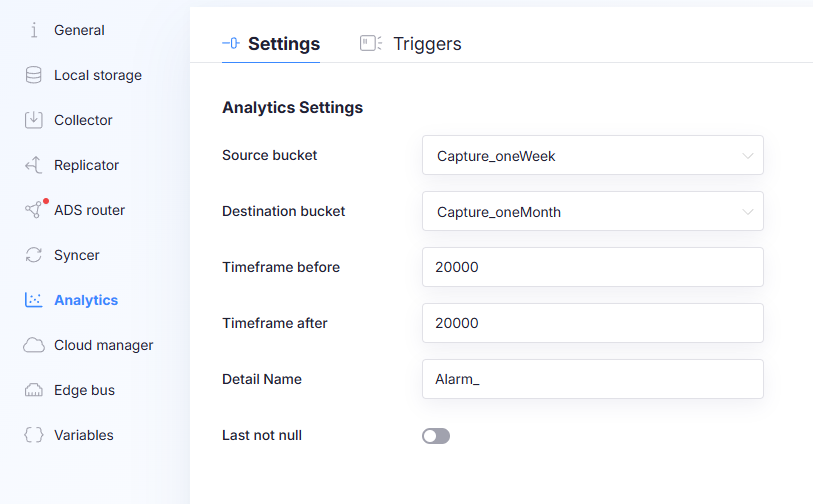
Analytics copies data from one bucket/measurement to another when a trigger event occurs. The main purpose is to keep or sync high-resolution data only around important events.
Use Analytics to:
- keep high-resolution data around an error event for longer retention (copy from a short-retention bucket to a long-retention bucket)
- sync high-resolution data to the cloud only around specific events, instead of syncing all high-resolution data continuously
Analytics does not change what the Collector stores. It duplicates data into a different destination bucket/measurement when triggers evaluate to true.
Settings tab
The Settings tab defines where data is copied from, where it is copied to, and which time window is captured around the event.
Source bucket
The bucket where the high-resolution source data is stored.
Destination bucket
The bucket where Analytics writes the copied data.
Pick a destination bucket with a longer retention policy than the source bucket.
Timeframe before
How far before the trigger event Analytics should copy data.
- Unit: milliseconds
Timeframe after
How far after the trigger event Analytics should copy data.
- Unit: milliseconds
The effective copied window is:
[event_time - Timeframe before, event_time + Timeframe after]
Measurement prefix
Prefix used when generating the destination measurement name.
Analytics creates a new measurement name by prefixing the source measurement:
- Source measurement:
SensorData - Detail name:
Alarm_ - Destination measurement:
Alarm_SensorData
This prefix determines the destination measurement naming scheme. Keep it stable to avoid creating multiple destination measurements unintentionally.
Last not null
When enabled, if no data is found in the configured time window, the last not-null value is copied to the new measurement.
Triggers tab
The Triggers tab defines the event conditions that cause Analytics to copy data.
Trigger list
- Click + to add a new trigger.
- Use the three dots menu on a trigger to Duplicate or Delete it.
- Selecting a trigger shows its configuration on the right.
Trigger fields
Measurement
The measurement (table) the trigger evaluates against.
Field name
The field/column name within the selected measurement used for evaluation.
Operator
Comparison operator used for evaluation:
<<==!=>>=
Value(s)
One or more values used for comparison.
If multiple values are provided, they are OR-combined.
Example with operator =:
- Field value is
7 - Value(s) are
5and7 - Trigger evaluates to true because at least one value matches.
How triggers and copying work together
When a trigger evaluates to true, Analytics copies data:
- from the configured Source bucket
- into the configured Destination bucket
- for the configured window: Timeframe before and Timeframe after
- into a destination measurement name computed using MeasurementPrefix + SourceMeasurement
If you choose large timeframes and triggers fire often, copied data volume can grow quickly. Use tight windows and specific triggers.