ADS router
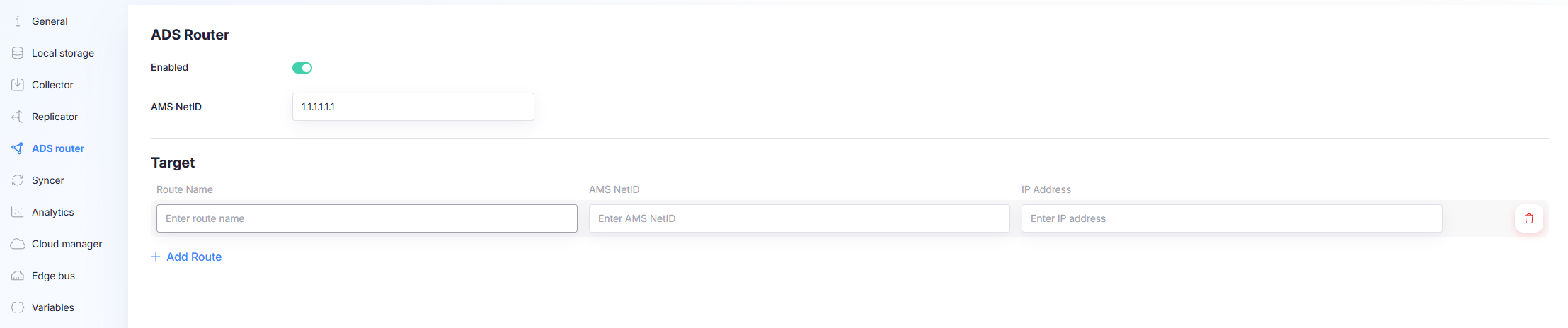
ADS connections require an ADS router to be present so the gateway can route ADS traffic to the target ADS device.
There are two supported setups:
- Windows + Beckhoff ADS Router: use the Beckhoff router installed on Windows and configure routes there.
- Capture Edge as ADS router: required on Linux and Docker, and optionally usable on Windows.
Choose the router implementation
Windows: Beckhoff ADS Router
If the gateway runs on Windows, you can use the Beckhoff ADS Router.
Required configuration:
- Configure a route in the Beckhoff router to the ADS target.
This page is not used to host routing in that case; routing is handled by the Beckhoff router. See Beckhoff documentation on how to create an ADS route using TwinCat.
Linux / Docker: Capture Edge as ADS router
On Linux and Docker, the only option is to run Capture Edge as the ADS router.
Required configuration:
- Enable ADS Router
- Set the gateway router AMS Net ID
- Add one or more Target routes (AMS Net ID + IP)
Settings
Enabled
Turns the Capture Edge ADS router on or off.
- Off: Capture Edge does not act as an ADS router.
- On: Capture Edge runs an ADS router and uses the configured AMS Net ID and routes.
AMS Net ID
The AMS Net ID that Capture Edge uses as the router identity.
This value must be consistent with the route you configure on the target ADS system back to Capture Edge.
A Beckhoff AMS Net ID is a six‑byte address that uniquely identifies a TwinCAT device or communication endpoint in the Beckhoff Automation Messaging System. The AMS Net ID functions like an IP‑independent identifier used by TwinCAT components to route messages internally and across networked PLCs, IPCs, and field devices. It is formatted as six dot‑separated bytes (for example: 192.168.1.1.1.1).
It is recommended, but not required, to use the IP address + "1.1".
Target routes
Target routes define where Capture Edge should route ADS traffic.
Each route contains:
- Route name: a friendly identifier for the route.
- AMS Net ID: the target system’s AMS Net ID.
- IP address: the target system’s IP address.
Add Route
Select Add Route to create a new target entry. Fill in Route name, AMS Net ID, and IP address.
Delete Route
Remove a route using the delete action on that route.
You must add a reverse route on the target system
When Capture Edge runs as ADS router, you must also configure a route on the target ADS system pointing back to Capture Edge:
- Destination: Capture Edge IP
- AMS Net ID: the AMS Net ID configured on this page (the top field)
Only one ADS router per IP
Only one ADS router can run per IP address. If another ADS router is already bound to the same IP, Capture Edge cannot run its ADS router on that IP.