Edge bus
If you don't see this page, you need to enable the Advanced options toggle in the top right.
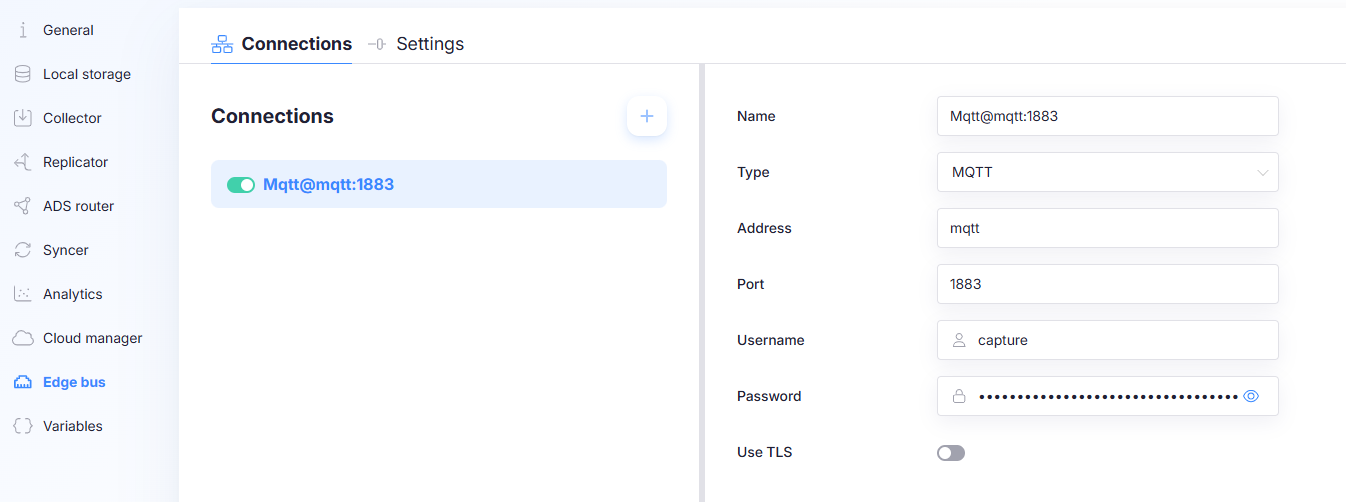
The Edge bus is an optional message bus for communication between applications running on the edge.
The Edge bus is not required for data collection or syncing. Enable it only if you have edge applications that need to exchange messages or consume published resources.
An Edge bus connection requires a running broker/service.
- If you select MQTT, an MQTT broker must be running and reachable.
- If you select Redis, a Redis instance must be running and reachable.
Connections tab
The Connections tab manages Edge bus connections. The left pane shows the configured connections; selecting a connection opens its settings on the right.
Enable/disable a connection
Use the toggle next to a connection in the list to enable or disable that Edge bus connection.
A connection can exist but be disabled. Only enabled connections are used for publishing and communication.
Add a connection
Select + to add a new Edge bus connection.
Connection fields
The exact fields depend on the selected Type.
Name
The Name field sets the display name of the Edge bus connection.
Type
Select the bus backend:
- MQTT
- Redis
Address
Host/address of the MQTT broker or Redis server.
Port
Port of the MQTT broker or Redis server.
Username / Password
Credentials for the broker/server, if authentication is required.
Use TLS
Enables TLS for the connection when supported by the selected backend and endpoint configuration.
Redis-specific options
When Type = Redis, additional fields can appear:
Database ID
Selects the Redis database index used for Edge bus traffic.
Use Redis JSON
When enabled, Redis JSON support is used (requires Redis JSON capability on the server side).
If the Redis server does not support Redis JSON, keep this disabled.
Settings tab
The Settings tab contains global Edge bus behavior.
Max message size (bytes)
Maximum payload size that Capture will publish to the Edge bus.
Artifact resources are automatically published to the Edge bus. If an artifact is larger than Max message size (for example a file), the artifact will not be published to the Edge bus.
Set this high enough to cover the artifacts you expect to distribute, but not so high that it encourages large payloads on the bus.