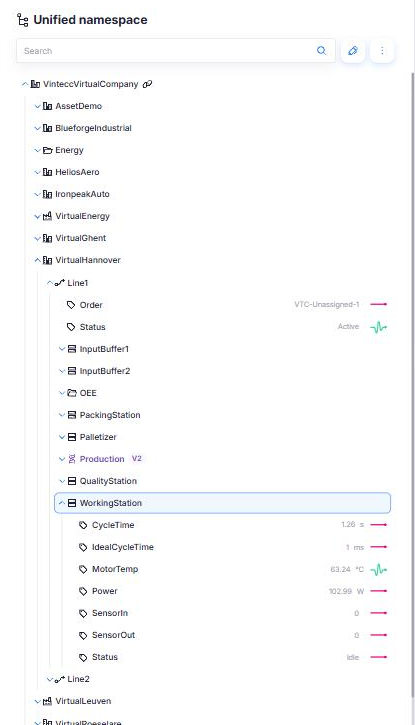
Equipment hierarchy
The Unified Namespace follows the equipment hierarchy of ISA-95 (IEC 62264), extended with the equipment and control modules of ISA-88 (IEC 61512). Every asset in the tree has a component type, and the type decides which types you may place directly under it.
The rules exist so that the same kind of thing sits at the same level in every company. A dashboard, an asset model or an integration that looks for "every production line under this site" then works everywhere.
The types
| Level | Type | Typical meaning |
|---|---|---|
| 1 | Enterprise | The company itself. Always the root of the namespace |
| 2 | Site | A plant or location |
| 3 | Area | A department or hall within a site |
| 4 | ProcessCell | A work centre for batch production |
| 4 | ProductionUnit | A work centre for continuous production |
| 4 | ProductionLine | A work centre for discrete production, such as a packaging line |
| 4 | StorageZone | A work centre for storage and movement of material |
| 5 | Unit | A unit within a process cell or production unit, such as a reactor |
| 5 | WorkCell | A machine or station on a production line |
| 5 | StorageUnit | A silo, tank or rack within a storage zone |
| 6 | EquipmentModule | A functional group of equipment within a unit or cell |
| 7 | ControlModule | A single sensor, actuator or device |
Custom | Anything that does not fit the levels above |
Type names are matched without regard to case. line and productline are accepted as other names for ProductionLine.
Your company may also have its own component types next to these. A type that is not in the table above is not constrained by the rules on this page.
What may go under what
| Parent | Allowed children |
|---|---|
Enterprise | Site, Area, any level-4 or level-5 type, Custom |
Site | Area, any level-4 or level-5 type, Custom |
Area | any level-4 or level-5 type, Custom |
ProcessCell | Unit, EquipmentModule, ControlModule, Custom |
ProductionUnit | Unit, EquipmentModule, ControlModule, Custom |
ProductionLine | WorkCell, EquipmentModule, ControlModule, Custom |
StorageZone | StorageUnit, EquipmentModule, ControlModule, Custom |
Unit, WorkCell, StorageUnit | EquipmentModule, ControlModule, Custom |
EquipmentModule | EquipmentModule, ControlModule, Custom |
ControlModule | ControlModule, Custom |
Custom | EquipmentModule, ControlModule, Custom |
The level-4 types are ProcessCell, ProductionUnit, ProductionLine and StorageZone; the level-5 types are Unit, WorkCell and StorageUnit.
Three more rules apply everywhere:
- Levels may be skipped. ISA-95 levels are roles, not a fixed depth. A small site can put a
ProductionLinedirectly under theSitewithout anArea. - A variable can go under any asset, but nothing goes under a variable. A variable is always a leaf of the tree. To give a value structure, model it as an asset that holds several variables.
- An
Enterprisecannot be created by hand. It is created together with the company, and it is always the root of that company's part of the namespace. A sub-company gets its ownEnterprisenode.
The rules are checked when a node is created, copied, imported or instantiated from an asset model. A node that already exists is never refused or moved because of them, so a tree built before the rules were introduced keeps working.
When a type is not allowed, the platform refuses the change with a message such as:
A Site cannot be placed under a ProductionLine. Allowed child types under a ProductionLine: WorkCell, EquipmentModule, ControlModule, Custom, or a variable.
Example
A packaging plant, as it is used in the examples of this guide:
acme                              Enterprise
└── ghent                         Site
    └── packaging                 Area
        └── line1                 ProductionLine
            ├── filler01          WorkCell
            │   ├── Speed         variable
            │   └── Pressure      variable
            └── capper01          WorkCell
                └── TorqueModule  EquipmentModule
                    └── Torque    variable
The UNS path of a node is the names from the root down, joined by dots: acme.ghent.packaging.line1.filler01. Integrations, context links and Grafana queries use this path to name a node.