Status section
A status section is used to analyze how long a value remains in specific states. Instead of showing raw data points, this section groups identical values together and calculates how often — and for how long — each value occurred.
What a status section is used for
This type of section is ideal when you want to understand the distribution of states over a period of time. Some common examples include:
- Machine states (e.g., Running, Idle, Error)
- Quality inspection results (e.g., Pass, Fail, Warning)
- Connection states (e.g., Online, Offline)
- Production line statuses (e.g., Active, Paused, Stopped)
- Sensor modes (e.g., Heating, Cooling, Standby)
For status sections, you need a query that returns:
- Time values showing when states change
- Status or state values (text or numeric categories)
- Typically ordered by time to show state transitions
Note: Since our test setup uses continuous numeric values rather than discrete states, the examples below demonstrate grouping and rounding techniques to create categories from numeric data. These same principles apply to actual status fields.
For more info on how to write queries, check the query differences for database and query examples
Basic example - Rounded power ranges
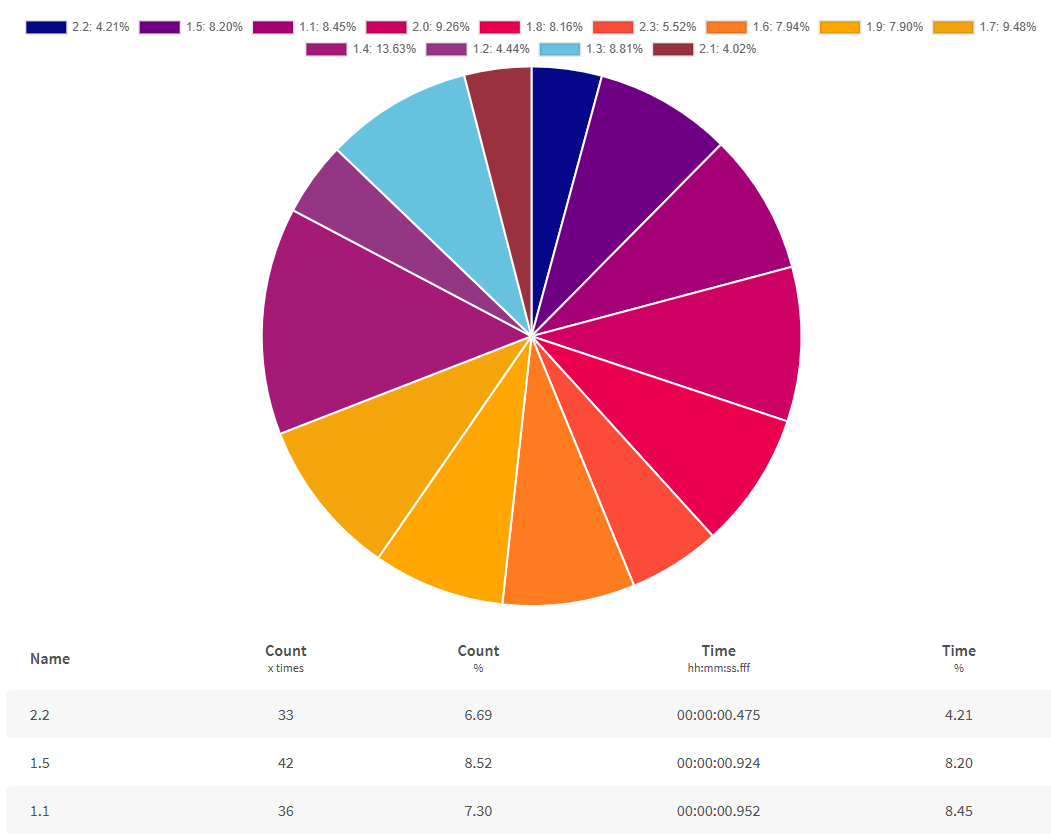
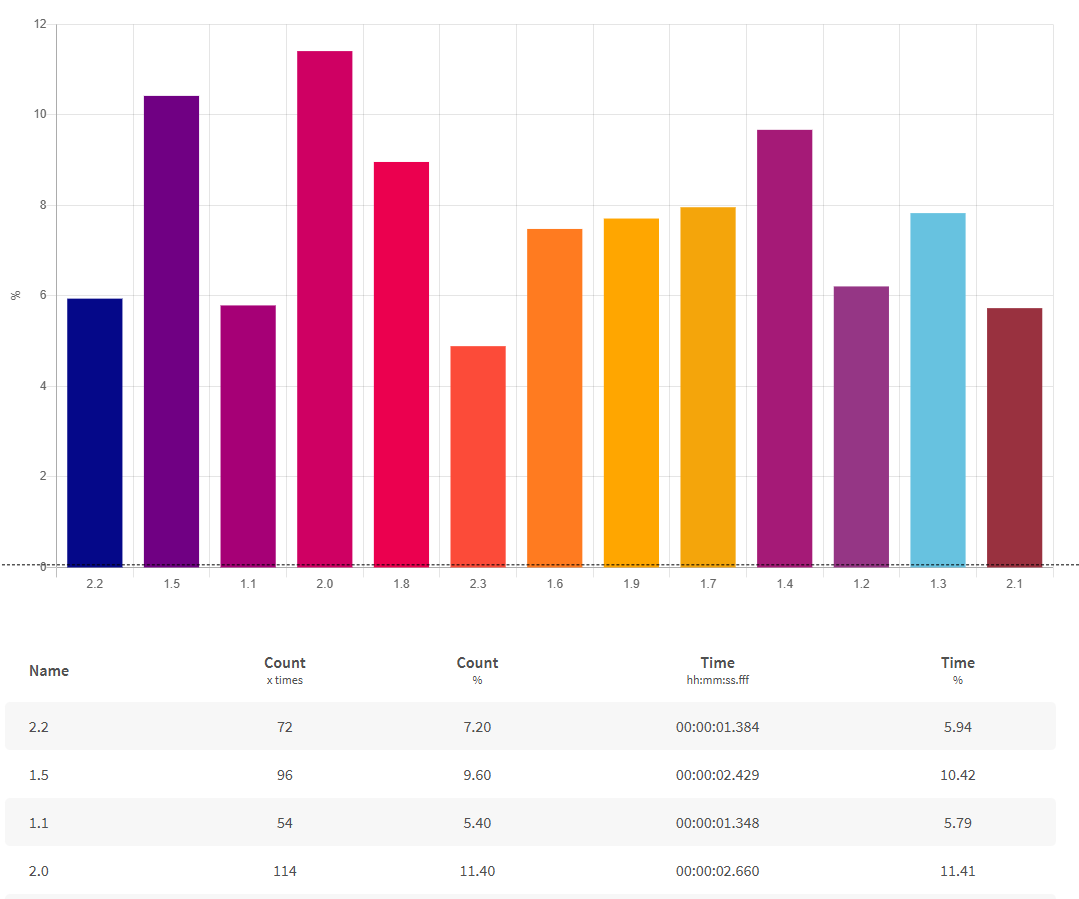 This example groups power values into ranges by rounding to the nearest 10 kW. This creates categories that simulate status states (e.g., Low: 0-10, Medium: 10-20, High: 20-30).
SELECT time AS "time",
floor(("InputBuffer1_PowerKw" + 5) * 10) / 10 AS "Power Range"
FROM "oneWeek"."Line1"
WHERE time >= '2026-05-03T10:00:00+02:00'
AND time < '2026-05-03T11:00:00+02:00'
SELECT
  time AS "time",
  ROUND("inputbuffer1_powerkw"::numeric, 1) AS "Power Range"
FROM "docsdemo_timescale_wide"."line1"
WHERE time >= '2026-05-03 10:00:00+02'
  AND time < '2026-05-03 11:00:00+02'
SELECT
  time AS "time",
  ROUND(value::numeric, 1) AS "Power Range"
FROM "line1"
WHERE name = 'InputBuffer1_PowerKw'
  AND time >= '2026-05-03 10:00:00+02'
  AND time < '2026-05-03 11:00:00+02'
WITH wide_data AS (
  SELECT
    time,
    CASE WHEN name = 'InputBuffer1_PowerKw' THEN value::numeric END AS power_value
  FROM "line1"
  WHERE time >= '2026-05-03 10:00:00+02'
    AND time < '2026-05-03 11:00:00+02'
    AND name = 'InputBuffer1_PowerKw'
)
SELECT
  time AS "time",
  ROUND(power_value, 1) AS "Power Range"
FROM wide_data
WHERE power_value IS NOT NULL
Categorized states with CASE statements
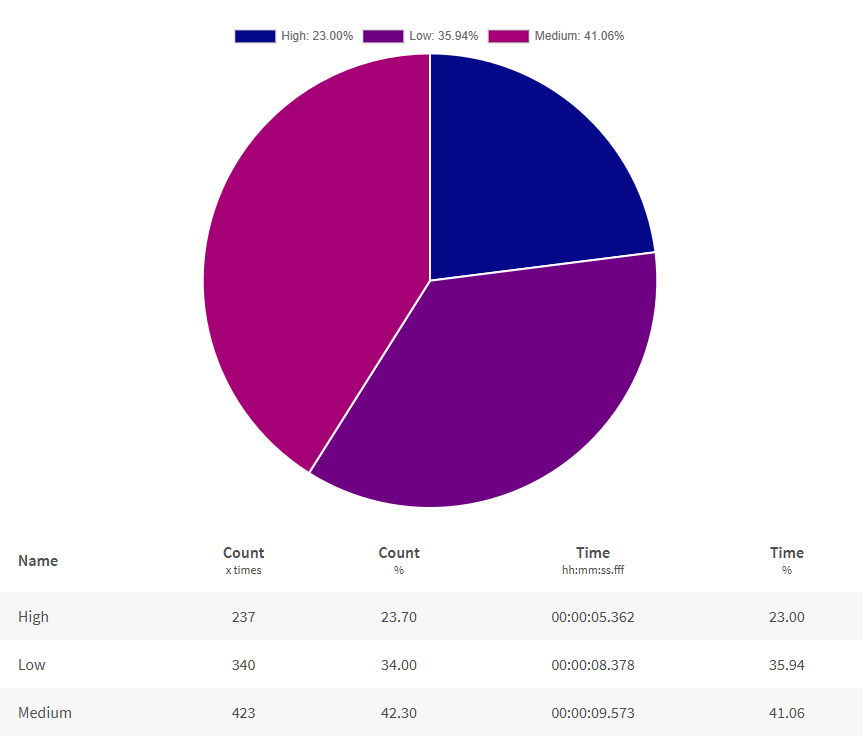
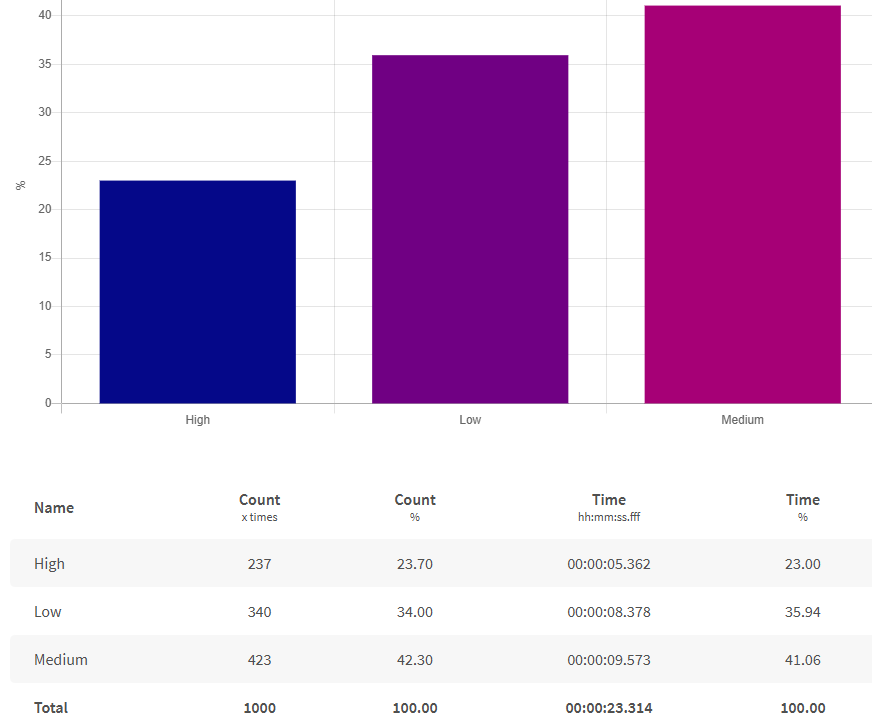
This example uses CASE statements to create explicit categories (Low, Medium, High) from numeric values, providing clear status labels.
Influx doesn't support CASE statements.
SELECT time AS "time",
CASE
WHEN "inputbuffer1_powerkw" < 1.5 THEN 'Low'
WHEN "inputbuffer1_powerkw" < 2 THEN 'Medium'
ELSE 'High'
END AS "Power State"
FROM "docsdemo_timescale_wide"."line1"
WHERE "inputbuffer1_powerkw" is not null
AND time >= '2026-05-03 10:00:00+02'
AND time < '2026-05-03 11:00:00+02'
SELECT
  time AS "time",
  CASE
    WHEN value::numeric < 1.5 THEN 'Low'
    WHEN value::numeric < 2 THEN 'Medium'
    ELSE 'High'
  END AS "Power State"
FROM "line1"
WHERE name = 'InputBuffer1_PowerKw'
  AND time >= '2026-05-03 10:00:00+02'
  AND time < '2026-05-03 11:00:00+02'
WITH wide_data AS (
  SELECT
    time,
    CASE WHEN name = 'InputBuffer1_PowerKw' THEN value::numeric END AS power_value
  FROM "line1"
  WHERE time >= '2026-05-03 10:00:00+02'
    AND time < '2026-05-03 11:00:00+02'
    AND name = 'InputBuffer1_PowerKw'
)
SELECT
  time AS "time",
  CASE
    WHEN power_value < 1.5 THEN 'Low'
    WHEN power_value < 2 THEN 'Medium'
    ELSE 'High'
  END AS "Power State"
FROM wide_data
WHERE power_value IS NOT NULL
Actual status field example
If you have actual status or state fields in your data, the queries are simpler. This example shows how to query a text-based status field directly.
SELECT
  time AS "time",
  "MachineStatus" AS "Status"
FROM "oneWeek"."Line1"
WHERE time >= '2026-05-03T10:00:00+02:00'
  AND time < '2026-05-03T11:00:00+02:00'
SELECT
  time AS "time",
  "machinestatus" AS "Status"
FROM "docsdemo_timescale_wide"."line1"
WHERE time >= '2026-05-03 10:00:00+02'
  AND time < '2026-05-03 11:00:00+02'
SELECT
  time AS "time",
  value AS "Status"
FROM "line1"
WHERE name = 'MachineStatus'
  AND time >= '2026-05-03 10:00:00+02'
  AND time < '2026-05-03 11:00:00+02'
WITH wide_data AS (
  SELECT
    time,
    CASE WHEN name = 'MachineStatus' THEN value END AS status_value
  FROM "line1"
  WHERE time >= '2026-05-03 10:00:00+02'
    AND time < '2026-05-03 11:00:00+02'
    AND name = 'MachineStatus'
)
SELECT
  time AS "time",
  status_value AS "Status"
FROM wide_data
WHERE status_value IS NOT NULL