Capture Edge Gateway
The Capture Edge Gateway is your industrial data collection device. It sits at the edge of your network, connects to your machines and sensors, collects data, and syncs it to the Capture Cloud platform.
What is an Edge Gateway?
An Edge Gateway is a ruggedized industrial computer running the Capture Edge software stack. It acts as the bridge between your shop floor (machines, PLCs, sensors) and the cloud.
Key responsibilities:
- Data collection — Connect to industrial protocols (Modbus, OPC UA, S7, MQTT, etc.)
- Local storage — Buffer data locally when internet is unavailable
- Edge processing — Run analytics and transformations at the edge
- Cloud sync — Reliably push data to cloud storage when connected
In older documentation, Edge Gateways were called Devices or Loggers.
Hardware Overview
A compact, open and modular gateway specially designed to connect your production devices to the cloud.
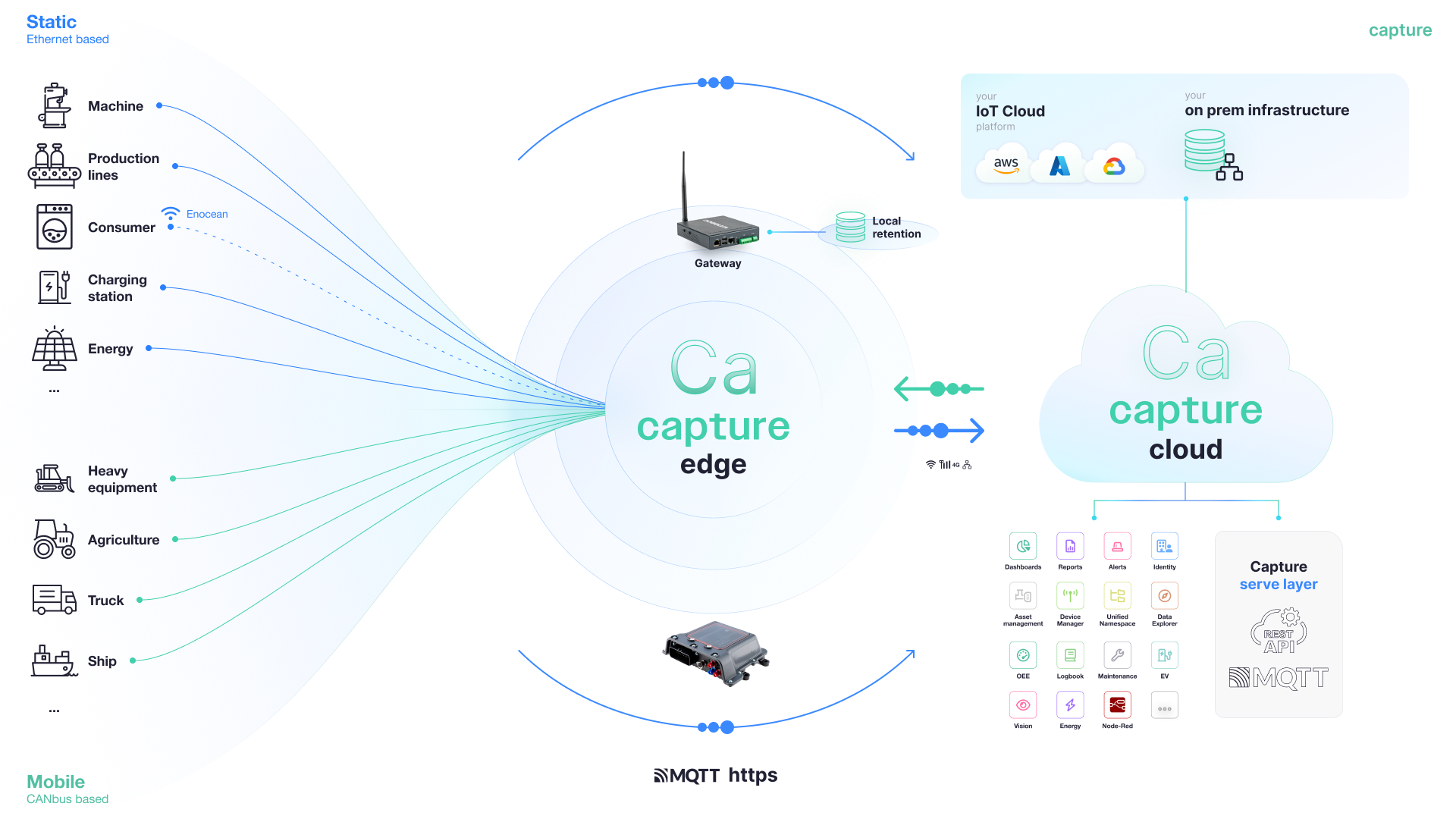
Connectivity:
- 2 x Gigabit LAN ports
- Wi-Fi client (2.4/5 GHz)
- Optional 4G/LTE cellular connectivity
Industrial I/O:
- CAN bus interface
- EnOcean wireless
- Extended I/O card
- Additional custom modules available
Storage & Security:
- Local data retention via microSD card (up to 256GB)
- Built-in TPM 2.0 security chip
- Secure boot and OTA updates
Design:
- Powerful yet energy-efficient
- Fully modular and customizable
- Industrial-grade reliability
View detailed specifications on the Vintecc IoT Edge Gateway blog.
Contact your Capture representative for detailed hardware specifications and purchasing options.
Key Features
Industrial Connectivity
The Edge Gateway supports a wide range of industrial protocols out of the box:
- Modbus TCP/RTU — Connect to PLCs, drives, and meters
- OPC UA — Standard industrial IoT protocol
- Siemens S7 — Direct PLC communication
- MQTT — Lightweight IoT messaging
- GPS — Location tracking for mobile assets
- REST APIs — Custom integrations
- And more...
See Configuration for the full list of supported connections.
Local Storage & Buffering
Data is stored locally first, ensuring no data loss even when the internet connection is interrupted. The gateway will automatically sync when connectivity is restored.
Local database:
- Time-series data stored in local InfluxDB
- Configurable retention policies
- Automatic cleanup of old data
- Resilient to power loss
Edge Analytics
Run analytics and processing at the edge before data reaches the cloud:
- Data transformations — Filter, aggregate, and calculate values
- Local dashboards — View data directly on the gateway
- Edge workflows — React to events in real-time
- Reduced bandwidth — Process locally, send only what matters
Remote Management
Once connected to the cloud, your gateways can be:
- Monitored — View status, health, and last communication
- Configured — Push configuration updates remotely
- Updated — Deploy software updates over-the-air
- Debugged — Access logs and diagnostics remotely
Learn more in Edge Gateways Overview.
Software Components
The Capture Edge software stack consists of several services:
Collector
Handles all data collection from configured sources (Modbus, OPC UA, etc.). Manages connections, polling, and local storage.
Syncer
Responsible for syncing collected data from local storage to cloud retention(s).
CloudManager
Manages cloud connectivity, licensing, provisioning, and configuration sync. Provides the local web UI for gateway management.
Analytics
Executes edge analytics workflows and local data processing.
Local InfluxDB
Time-series database for local data buffering.
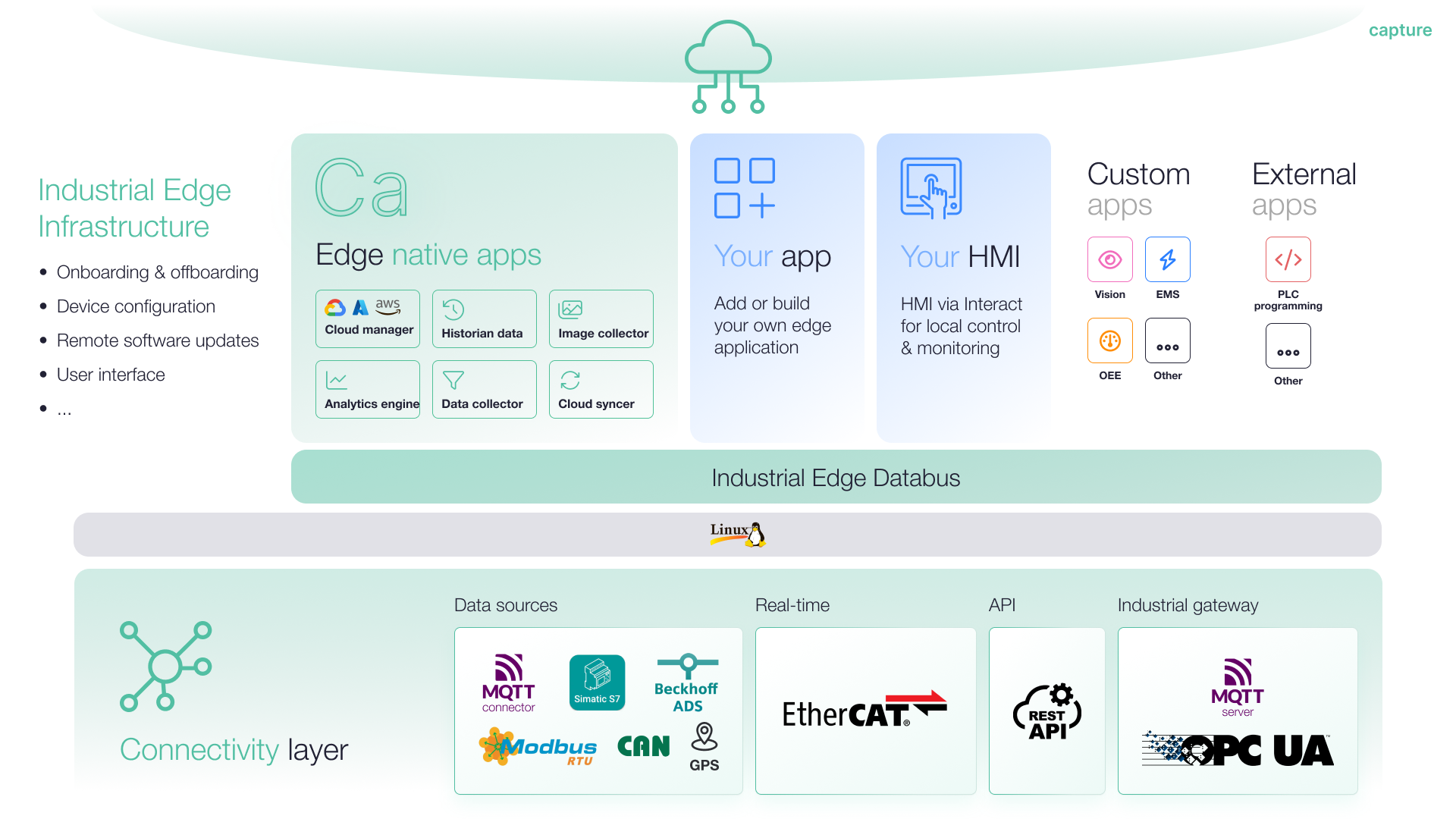
Supported Operating Systems
Capture Edge software can be installed on:
- Windows — For industrial PCs and standard computers
- Linux (ARM/x64) — For embedded systems and IoT gateways
- Docker — For containerized deployments
See Installation for platform-specific instructions.
Next Steps
- Onboarding your first device — Register your gateway in the cloud
- Configuration Guide — Set up your first data collection