Cloud connect requirements
This guide describes what the network has to allow for a Capture Edge gateway to reach the Capture cloud portal.
Two independent channels
A gateway talks to the cloud over two channels that fail independently. Both go outbound over TLS; nothing has to be opened inbound.
| Channel | Carries | Transport |
|---|---|---|
| Requests | software updates, artifacts, configuration, device registration | HTTPS, always |
| Messaging | commands, status, heartbeat, live log streaming | MQTT, or MQTT over WebSocket — whichever gets through |
A gateway with no messaging channel at all still updates itself, fetches artifacts and pulls its configuration. It is simply slower to hear that something has changed, and the portal's live views (Messages, real-time status) stop working.
Which components connect
Four of the Capture services hold their own connection to the cloud:
| Component | What it uses the cloud for |
|---|---|
| CloudManager | Device registration, fetching new configurations, receiving remote software updates, heartbeat and status |
| Collector | Commands, status and log streaming. Also real-time point forwarding, when a real-time sync destination is configured against the Capture broker |
| Syncer | Batch upload of collected data over HTTPS, plus commands (including resync), status and log streaming |
| Analytics | Commands, status and log streaming |
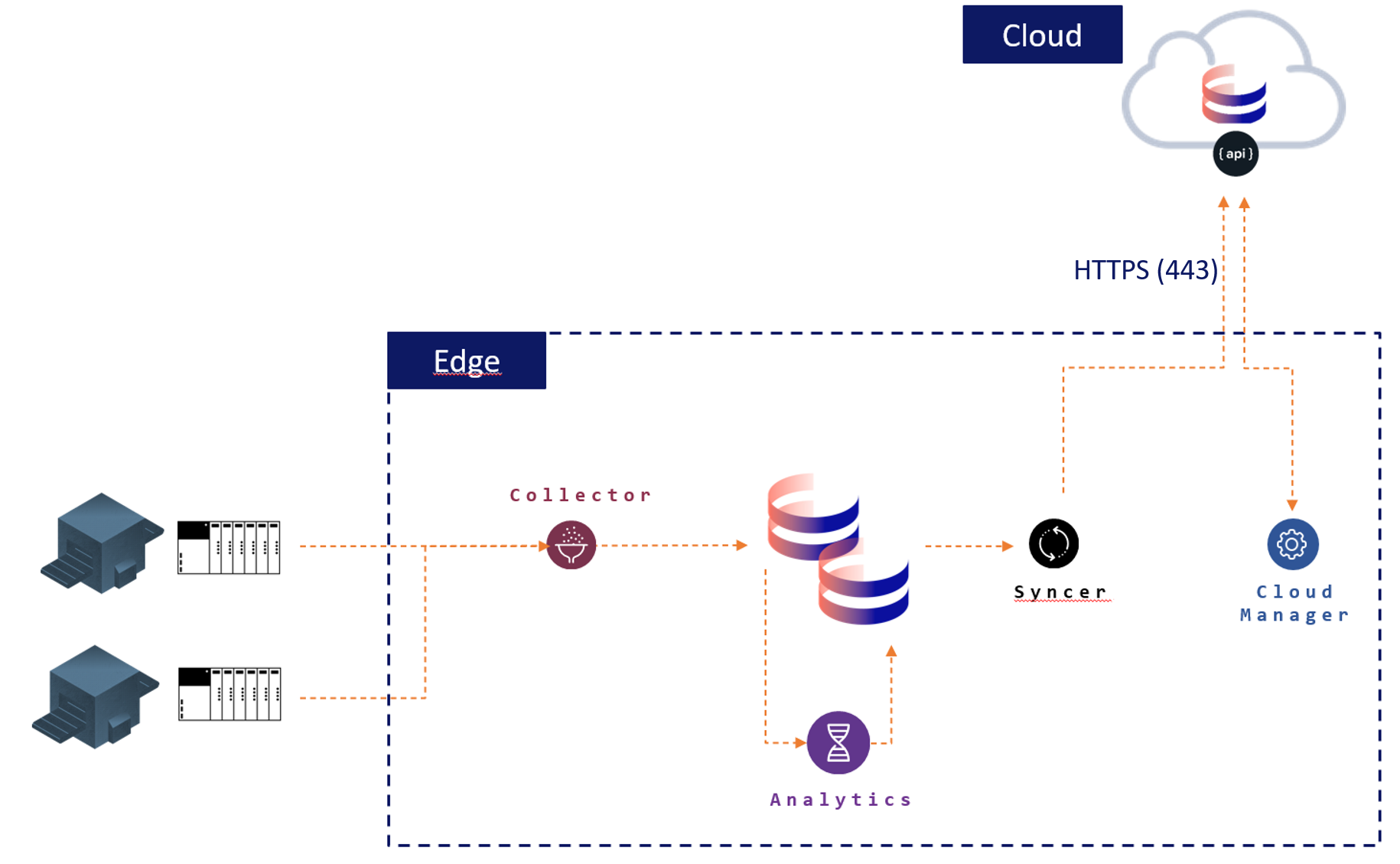
Each component connects under its own MQTT client id, so one gateway holds up to four broker sessions at the same time. This is expected and is not a sign of a reconnect loop.
Required firewall settings
The gateway needs outbound HTTPS access. A simple test is to browse to https://portal.captureplatform.com from the edge device itself. Navigating to this domain must be allowed.
| Port | Protocol | Application | Direction | Required? |
|---|---|---|---|---|
| 443 | TCP | HTTPS | Outbound * | Yes |
| 53 | TCP/UDP | DNS | Outbound * | Yes |
| 8883 | TCP | MQTTS | Outbound * | Recommended |
* Linux systems also need an inbound rule for Established and Related connections.
If port 8883 is blocked
Capture Edge does not go silent when the MQTT port is closed. It uses the first of these transports that connects:
- MQTT over TCP, on port 8883 — the fast path, and what an unrestricted network uses.
- MQTT over WebSocket, to
wss://<broker host>/mqtton port 443 — the same protocol, carried over an ordinary HTTPS connection, so it survives most port filtering.
While it is running on WebSocket, the gateway keeps trying port 8883 in the background and moves back as soon as it answers. Nothing has to be configured for this: the WebSocket endpoint is derived from the broker address the gateway already has.
These are the only two messaging transports. A network that blocks port 8883 and WebSocket traffic to the broker host on port 443 leaves the gateway with no messaging channel at all. It still updates itself and pulls its configuration over HTTPS, as described above, but commands, status and the portal's live views do not work.
Opening 8883 is still worth doing. The ladder is there so that a restricted network keeps working, not as a replacement for the fast path.
Which transport is in use is shown per service in the Cloud link column of the Status page in the CloudManager UI: Connected, with over mqtt or over websockets underneath.
Domains
The edge device must be able to reach all of the following. Allow both the captureplatform.com and the
capture-vintecc.com hosts: the default configuration of Capture Edge 2.3 sends its HTTPS requests to
portal.captureplatform.com and uses the mqtt.captureplatform.com MQTT broker, while a gateway installed
with an older version keeps the capture-vintecc.com hosts it was configured with: Capture Edge does not change
them on an update.
| Host | Port | Used for |
|---|---|---|
portal.captureplatform.com | 443 | The Capture portal, and every HTTPS request in the default configuration of 2.3 and newer: registration (/Provisioning), authentication (/auth), software updates (/Updater) and data upload (/api/data) |
mqtt.captureplatform.com | 8883, 443 | MQTT broker in the default configuration of 2.3 and newer, and its WebSocket fallback on 443. A Docker CloudManager started without a configuration uses it too |
broker.capture-vintecc.com | 8883 | MQTT broker on a gateway whose configuration still names this host, typically one first installed with a version older than 2.3. It serves no WebSocket fallback, so such a gateway has a messaging channel only while port 8883 is open |
capture-vintecc.com | 443 | The same HTTPS requests on a gateway whose configuration still names this host, typically one first installed with a version older than 2.3 |
harbor.mgmt.vintecc.cloud | 443 | Capture Edge image pull (Docker installations only) |
Docker Hub (registry-1.docker.io, auth.docker.io and the hosts Docker Hub serves image layers from) | 443 | The influxdb:1.8.10 image pull (Docker installations only) |
get.docker.com, download.docker.com | 443 | Installing Docker, only when the Docker installer finds no Docker on the device |
A gateway that is registered against a different Capture environment uses that environment's hosts instead.
The addresses in use are in the gateway's configuration: the HTTPS endpoints under CloudManager, and the
broker as mqttEndpoint.
Optional firewall settings
The CloudManager component hosts a local web page with:
- An overview of the Capture services and what they are reporting
- The configuration editor and a list of configuration backups
- License / config uploading
- Component logs and the issues the services are reporting
- The diagnostics download
Open it on the edge device at http://localhost:5004; no firewall change is needed
for that. The older address http://localhost:5004/api/ui still works and redirects to the current UI at
/ui/v2.
To reach it from another machine, at http://<ip edge device>:5004, port 5004 must be opened inbound.
| Port | Protocol | Application | Direction |
|---|---|---|---|
| 5004 | TCP | CloudManager app | Inbound / outbound |
| 5005 | TCP | EdgeApi (only when EdgeApi is installed and reached from another machine) | Inbound |
| 18830 | TCP | EdgeApi MQTT relay (same) | Inbound |
The CloudManager web UI has no login, and neither does the API behind it. Anyone who can reach port 5004 can read the full configuration, change it, restore an old one and restart the services. Only open this port on a network you trust, and prefer reaching the page from the device itself.
EdgeApi's ports do not check who connects either: port 18830 accepts every MQTT client and passes it on to the cloud broker.